Linux Mint Forums
I’ve a question about Bitcoin Core.
How can i change the data directory to store the blockchain ?
I tried many things like change strDataDir in the Bitcoin-Qt.conf but in vain.
I’ve also seen that the default directory is /home/user/.var/app/org.bitcoincore.bitcoin-qt/ and not /home/user/.bitcoin
The official FAQ say it should ask me at the start where i want to store this but i’ve never had this window.
The install has been made in Linux Mint Cinnamon 20.1 with Flatpak.
Thx for your help.
Re: Bitcoin Core, change blockchain directory
Post by mikeflan » Sun Feb 14, 2021 10:04 am
Re: Bitcoin Core, change blockchain directory
Post by gecko64 » Sun Feb 14, 2021 11:52 am
Re: Bitcoin Core, change blockchain directory
Post by gecko64 » Sun Feb 14, 2021 1:04 pm
Re: Bitcoin Core, change blockchain directory
Post by mikeflan » Sun Feb 14, 2021 7:09 pm
Re: Bitcoin Core, change blockchain directory
Post by paxdriver » Sun Oct 03, 2021 12:05 pm
If you installed bitcoin-core from the software manager, bitcoin may be installed as a flatpak, which changes all the file paths from most of the other answers you’ll get on this question from a search. I did manage to find out how to do this though, so hopefully it’ll help someone else figure it out too.
Before starting out, make sure to back things up.
First, after installing bitcoin core and running it and having it working, close it. In the terminal type «flatpak list». If in that output you see «org.bitcoincore.bitcoin-qt/x86_64/stable» or something similar, then this approach will work for you.
First, locate you data directories being used currently by the bitcoin-qt app: in a terminal, type «locate bitcoin-qt» and you should get an address starting from the home directory «
/.var/.app/org.bitcoincore.bitcoin-qt» from the output command.
Second, locate the drive and folder you’d like to use for bitcoin wallets and block chain instead. (I’m using a drive mounted under «/media/userName/CryptoSSD/.bitcoin» for this example).
Third, copy the contents of the ‘org.bitcoincore.bitcoin-qt/data’ directory into my «/media/userName/CryptoSSD/.bitcoin» directory.
Fourth, tell flatpak to allow using another filesystem. The launcher that was installed earlier runs bitcoin-qt through ‘flatpak run bitcoin-qt’ command, so we need to allow flatpak to see outside of its sandbox. In ther terminal, use: ‘sudo flatpak override org.bitcoincore.bitcoin-qt —filesystem=/media/userName/CryptoSSD/’ to accomplish this.
Fifth, the bitcoin-qt creates a ‘bitcoin.conf’ file, for configuration changes. These are the same commands as can be typed into the terminal of the bitcoin-qt console when the app is running, but we want the commands to run before the app launches so that it’s using the directories we specify rather than the default paths.
If you’ve already let bitcoin run and download a blockchain, you can change where that points to by adding to bitcoin.conf «blocksdir=/media/userName/CryptoSSD/.bitcoin». This way you can store the whole block chain on a separate drive or partition from your other stuff. It’s also helpful if you’ve already got a system with the blockchain downloaded and you don’t want to have to wait for it to download all over again on another computer you can use an external hard drive or something.
If you haven’t already downloaded the blockchain through bitcoin-qt’s startup or didn’t let it finish, that’s fine too, you can let it start now that you’ve got a path specified to download it to where you want it to stay.
Most importantly, bitcoin.conf can specify the data directory where you’ve got your backup wallets stored as ‘.dat’ files (the default for bitcoin-core wallets). in the bitcoin.conf file, add the line:
«datadir=/media/userName/CryptoSSD/.bitcoin» and save it.
Now you can launch bitcoin through the whisker menu or desktop shortcut and you’ll be able to open wallets from File->open wallet, then switch between wallets which have been opened by the dropdown list on the top right of the application.
Keep in mind I gave you the paths I used so I can say for sure that this approach works in Mint 19.1 as of today, but yours will have to be slightly different to accommodate the file paths in your systems.
It too me quite a while to figure this out and I haven’t seen anyone online thoroughly explain this so hopefully this saves someone else the grief and sleuthing I went through to try to understand how/what/why bitcoin on LM was so difficult to configure.
Bitcoin core указать где лежат блоки
Reddit and its partners use cookies and similar technologies to provide you with a better experience.
By accepting all cookies, you agree to our use of cookies to deliver and maintain our services and site, improve the quality of Reddit, personalize Reddit content and advertising, and measure the effectiveness of advertising.
By rejecting non-essential cookies, Reddit may still use certain cookies to ensure the proper functionality of our platform.
For more information, please see our Cookie Notice and our Privacy Policy .
Set up a Bitcoin-Core Full Node with a custom data directory

Setting up a Bitcoin-Core Full Node and store the .bitcoin directory in a specific location, for example on an external hard drive, can be a challenging task for people that are new to the space. The documentary is poor and quickly gets technical on such topics and therefore I publish this little guide to set up a Bitcoin node and store the .bitcoin folder in a chosen directory.
Download — Unpack
The first step is downloading the Bitcoin Core Client Software:
Best, refer to this official material for downloading and unpacking the client software.
For Linux, unpack the tar.gz with the following command:
This will create a new folder called bitcoin-22.0 within the current directory
Navigate into the directory
Create configuration file with the following settings
Paste…
Start Bitcoin Node
Test it …
If successfull, this should give you an output that looks like the following:
Done.. After starting the Bitcoin daemon, the programm will create a directory called blocks within the specified data directory in which the blk*****.dat are stored.
Указать где лежит wallet BitCoin или DogeCoin
Программа Bitcoin Core по-умолчанию ставится на системный диск в каталог Program Files, так как файлы баз транзакций занимают много места (около 50 Гб), то бывает нужно изменить их расположение на другой диск, возможно даже хранить на отдельном быстром диске для программ криптовалют.
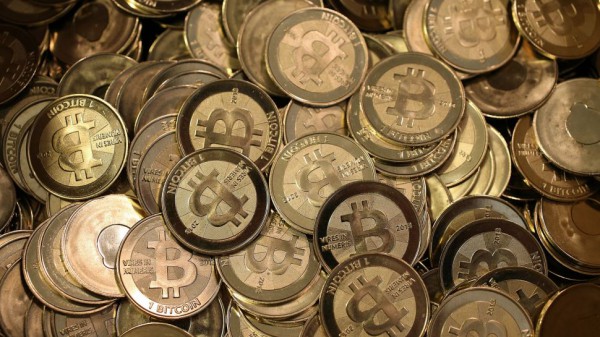
Если же у вас быстрый большой диск под систему (SSD от 120Гб), то вам ничего дополнительно делать не нужно, просто поставить BitCoin Core или DogeCoin Core.
Скопировать файл wallet.dat в / /AppData/Roaming/Bitcoin/wallet.dat и приступать к синхронизации.
Для того чтобы понимать что где и как, я использую для запуска кошельков ярлык с параметром -datadir.
Параметр -datadir указывает программе, где находятся файлы с базами транзакций и кошелька.
Рассмотрим конкретный пример на кошельке Dogecoin.
В каталоге Dogecoin создаем каталог store, кладем туда wallet.dat и указываем в ярлыке
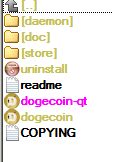
В свойствах ярлыка это будет выглядеть вот так
Теперь dogecoin-qt.exe будет искать нужную информацию в подкаталоге store.
Так же будет работать и для bitcoin-qt.exe.
Измененный ярлык можно скопировать, например на рабочий стол и запускать кошелек с его помощью.