Sorry, you have been blocked
This website is using a security service to protect itself from online attacks. The action you just performed triggered the security solution. There are several actions that could trigger this block including submitting a certain word or phrase, a SQL command or malformed data.
What can I do to resolve this?
You can email the site owner to let them know you were blocked. Please include what you were doing when this page came up and the Cloudflare Ray ID found at the bottom of this page.
Cloudflare Ray ID: 80ec34027c204107 • Your IP: Click to reveal 45.84.122.41 • Performance & security by Cloudflare
Huobi ECO Chain
Huobi ECO Chain (Heco) – децентрализованная, высокоэффективная и энергосберегающая общественная сеть. Это первый продукт, запущенный на открытой платформе Huobi. Heco разработан для реализации совместимости смарт-контрактов на основе поддержки высокопроизводительных транзакций. Собственный цифровой актив Huobi Eco-Chain Heco — HT. Он использует механизм консенсуса HPOS.
HECO Whitepaper:https://www.hecochain.com/developer.133bd45.pdf
Документация для разработчиков HECO:https://docs.hecochain.com/#/intro
Трехэтапное руководство по началу подоходного фарминга с помощью DeFi
Чтобы начать майнинг в HECO, вам необходимо загрузить кошелек HECO и перенести соответствующие активы в кошелек. Чтобы инвестировать в активы для майнинга и получать доход, вы можете выполнить следующие шаги:
Шаг 1. Загрузите приложение кошелька и создайте кошелек HECO.
Майнинг на HECO осуществляется через соответствующий кошелек, поэтому первый шаг требует, чтобы мы загрузили кошелек. Кошельки, которые в настоящее время поддерживают HECO, следующие:
Нажмите здесь чтобы посмотреть больше кошельков.
Шаг 2. Перенести активы в кошелек
После завершения загрузки кошелька вам необходимо перенести активы в кошелек. Перенос токенов HRC20 из Huobi Global в HECO – обычная практика. Возьмем для примера кошелек Huobi:
1. Найдите адрес кошелька, как показано ниже:
2. Для вывода активов, во-первых, вам необходимо иметь цифровые активы в учетной записи Huobi Global. Вы можете выбрать актив, который хотите перевести, на странице «Балансы».
3. Скопируйте и вставьте адрес своего кошелька Huobi и сумму транзакции в строку, показанную ниже, и подтвердите комиссию за транзакцию (которая, как вы обнаружите, намного ниже, чем комиссия Ethereum).
Обратите внимание, что при переводе монет выберите HECO в качестве имени цепочки, что является стандартом токенов для Huobi Eco-Chain. Убедитесь, что вы выбрали Heco и ваш адрес для вывода средств соответствует стандарту Heco. В противном случае вы можете столкнуться с риском потери активов.
4. Нажмите «Вывести» и подтвердите перевод с помощью кода подтверждения входа и соответствующей информации.
5. После этого проверьте свой баланс в кошельке Huobi.
Шаг 3. Изучение популярных проектов HECO
Вот несколько последних популярных проектов на HECO, которые приведены ниже только для справки. Вы можете майнить согласно соответствующему руководству и получать доход.
MDEX
1. Официальный сайт: https: //mdex.com/
2. Подготовьтесь к майнингу.
○ Загрузите кошелек и выполните 3 шага, описанные выше.
○ Вы можете узнать больше по ссылке https://ht.mdex.com/#/swap
3. Больше информации
○ Свопнуть, такие как MDX и HUSD, здесь https://ht.mdex.com/#/swap
○ Обменяйте на майнинг :https://ht.mdex.com/#/reward
○ Майнинг ликвидности : https://hpool.mdex.com/#/menu
LendHub
Официальный сайт: https: //www.lendhub.org/
CoinWind
Официальный сайт: https: //coinwind.pro/
WeStarter
Официальный сайт: https: //www.westarter.org
Подробности: WeStarter Гид
Где найти самую свежую информацию?
Официальные каналы HECO:
● Официальный сайт HECO: https: //www.hecochain.com/
Информация и данные:
● Информация о проектах HECO : https: //hecoinfo.com/
Проекты HT / USDT без непостоянных убытков
Вот краткое изложение недавних популярных майнинговых проектов USDT и HT без непостоянных потерь для вашей справки. Вы можете следовать руководству, чтобы испытать это на себе.
Комбинированный майнинг LP с низким уровнем риска (досрочное погашение может привести к убыткам)
Dfuture
Майнинг на одной монете
Supernova
Вложение одной монеты
Вложение одной монеты
hecofi
Вложение одной монеты
Depth
Channel
Кредитование одной монетой
Filda
Кредитование одной монетой
Lendhub
Кредитование одной монетой
Майнинговый проект HT без непостоянных потерь на HECO
Вложение одной монеты
Coinwind
Вложение одной монеты
Supernova
Вложение одной монеты
Filda
Вложение одной монеты
hecofi
Вложение одной монеты
Будут опубликованы другие проекты. Следите за обновлениями.
Introducing the Harmony HRC-20 Governance

The Harmony team is releasing the HRC-20 Governance as a next step into decentralized governance. This is intended for all projects that have their own HRC-20 token on the Harmony network, enabling them to have their own governance system.
What is HRC-20?
HRC-20 are fungible tokens minted on the Harmony network, much like ERC-20 tokens are on Ethereum. Functionality wise, the HRC-20 is similar to ERC-20 tokens like USDC, UNI, SUSHI, etc., except that it is issued and used on the Harmony network, instead of on the Ethereum network. This is most useful for any applications that need their own token and want to build on Harmony.
Why governance?
Governance is an important aspect in the blockchain world today. It represents the ability for people to vote, much like everyone votes for political parties, presidents, etc. In blockchain it is no different, except that it is decentralized and radically more fair. In Harmony, we want our communities to have their voices heard and their votes matter. The community members get to help make decisions on Harmony or protocols living on it. We want every single user to have their voice heard and help drive the projects further as a decentralized community.
Projects: How do you apply for your own governance section?
Project owners or users can apply for the governance section by following these steps:
- Fork this repository https://github.com/harmony-one/snapshot-spaces
- Create project name in the “spaces” directory, containing the files as in the “examples” sub-folder
- Create any changes to the voting mechanism, such as including the staked or LP-ed tokens by modifying the snapshot.js library which is managed by snapshot-lab. You can submit a PR in this repo: https://github.com/snapshot-labs/snapshot.js
- Submit a whitelist of addresses that are allowed to create proposals (optional)
- Submit a PR to the original repository; add reviewers
Users: How does it work?
The governance app is available at https://governance.harmony.one. To interact with it, you need to connect your One Wallet or Metamask extension, the same as using Metamask on Ethereum.
Any HRC-20 token holder can create or vote on proposals within their own project, unless specified differently by the project creators. For example, Mochi (hMochi) owners can create and vote on Mochiswap projects. When voting, by default, only the tokens you hold in the wallet will contribute to your voting power, unless specified differently by the project.
Rules and guidelines:
- Anyone can create a proposal that hold the correlated HRC-20 token, unless specified differently by the project
- The voting proposal on forum should include details on what percentage of total tokens held is needed for the vote to pass and have the project name in bracket before the name, for example: [Mochiswap] Change of farming rewards
- The voting app takes a snapshot of the balances at the block in which it was created, so your voting power is therefore locked in to whatever amount of tokens you held at that point
- All votes are final, once you approve your vote, you cannot undo or change it
Creating a proposal
To create a proposal navigate to the governance app, connect your One Wallet or MetaMask, then click on New proposal on the top right corner.
You can now start writing a new proposal:
1 — The title of the proposal.
2 — The body of the proposal; e.g. what you want people to vote on and any explanation, facts, examples, etc. The proposal should include the following key sections:
- Summary: one short paragraph to describe the proposal
- Background: background information on the proposal
- Link: link to the detailed proposal and discussion in the forum
- Motivation: why this proposal is needed and important
- Specification: specific action or changes proposed in the proposal
- Vote: specify voting options and what each one means if voted for
3 — Voting choices; you add choices for voting, minimum is 2, but you can always add more choices with the Add choice button below.
4 — Select the date and time at which the proposal will be open for voting.
5 — Select date and time at which the proposal will close for voting.
6 — The block number in which the proposal was submitted.
7 — Publish once done with all previous steps and confirm with a signed message from your validator address via One Wallet.
Voting on a proposal
To vote for a proposal, simply navigate to the Active tab and click on a proposal you want to vote on. Read what the proposal is about, select your choice and confirm with a signed message from your wallet:
What is HECO Chain?
HECO stands for Huobi ECO Chain which is a high-efficient, open-source Blockchain developed by the popular Huobi Exchange. The whole platform is based on the PoS (Proof-of-Stake) protocol. Its block interval is 3s that supports over 500 TPS (transaction per second).
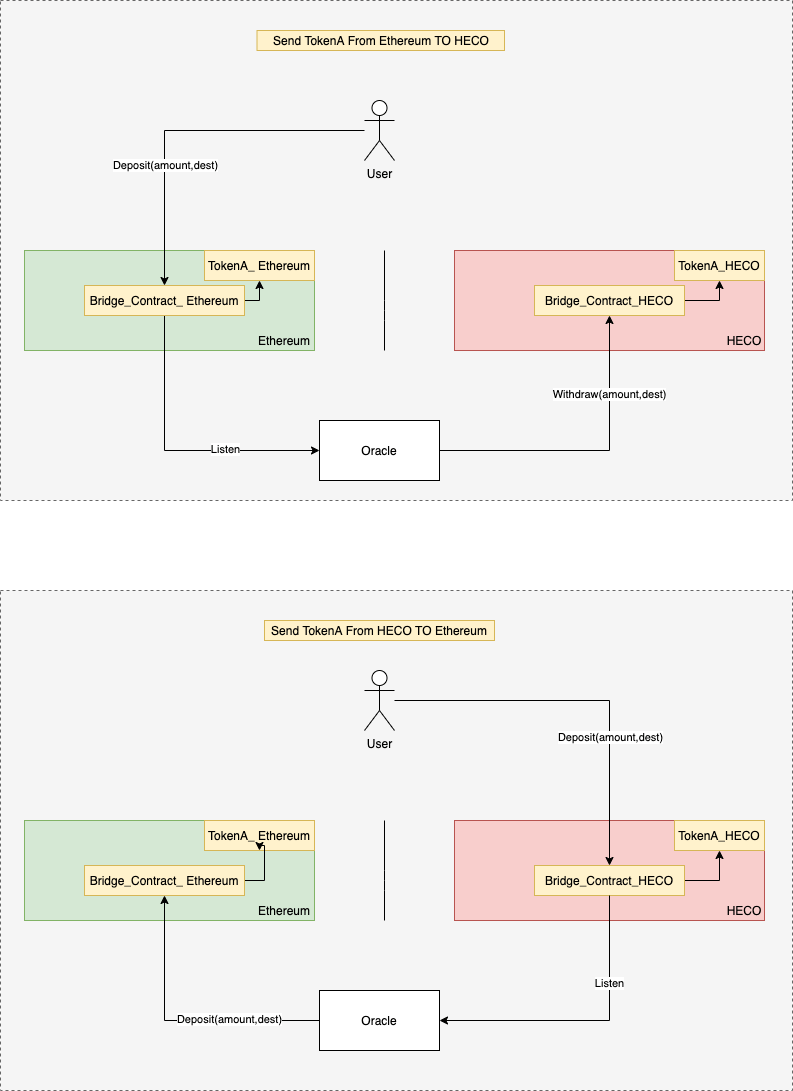
HECO is fully compatible with EVM programming, which simplifies the process of bridging assets from Ethereum to HECO.
Huobi Token & HRC-20 Token
$HT (Huobi Token) is the native token of the whole HECO ecosystem.
The token has 18 decimals and exists on both Ethereum and HECO.
In the early phrase of the development, HECO introduces the HRC-20 standard. It corresponds with the ERC-20 standard on Ethereum.
HRC-20 is the foundation for developers to create a wrap-version of mostly any tokens on HECO. It includes the native token HT and Bitcoin.
$HT token plays an important role that ensures the stability and security of the HECO network.
- Pay for transaction fee
- Stake to secure the network and earn reward
- Open governance
HECO Bridge
At the time of this article, there is no native bridge for regular users, just yet. HECO Bridge mostly exists for developers by interacting with Smart Contract.
- Bridge Contract on Ethereum: 0xa929022c9107643515f5c777ce9a910f0d1e490c
- Bridge Contract on HECO: 0xa929022c9107643515f5c777ce9a910f0d1e490c
In fact, there is way for users to convert ERC-20 Token to HRC-20 Token is to use multichain.xyz
HECO Dapps
In an effort of expanding the native community, Huobi Open Platform has incentivized various Dapps to develop on HECO.
As a result, their community is growing quickly from DeFi to Gaming, NFT, DAO, etc.
See the full list of HECO Dapps

Huobi Token Price Prediction
$HT (Huobi Token) is not just the native token of the HECO network. It’s also the native token of the Huobi Exchange.
Huobi Token represents the power of Huobi Exchange, which is the second-largest Cryptocurrency Exchange by volume at the time of this article.
Hence, it’s crucial for Houbi to maintain the performance of this token.
Also, Huobi just introduced the burn feature and Houbi Prime, which lets users participate in IEO events.
In short, from time to time, Huobi Token price will most likely rise up in accordance with the maturity of the exchange.
Which wallet supports HECO?
To enjoy the power of HECO, you need to connect to its network.
The Fastest Way: KEYRING PRO
This method will save you time in setting up your wallet, or approving your transactions.
KEYRING PRO exists as a Multichain Mobile Browser Extension, supports a wide range of Blockchain from Ethereum to Polygon, Binance Smart Chain, Huobi ECO Chain, Fantom, Avalanche, Harmony ONE, TomoChain, and more (coming soon).
ALL YOU NEED TO DO IS ONE SCAN
KEYRING PRO is now available on App Store, Play Store, and as APK for limited locations.
1. On KEYRING PRO, ‘Create a new wallet’ or ‘Import a wallet’, you can use 01 Private Key to import all wallets at once on all supported chains, which includes Bitcoin (BTC), Ethereum (ETH), Binance Smart Chain (BSC), Huobi ECO Chain (HECO), Harmony One (ONE), Polygon (MATIC), TomoChain (TOMO).
2. Go to HECO Dapp
3. Click ‘Connect to a Wallet’
4. Choose Wallet Connect, scan with KEYRING PRO, then choose ‘Connect’
Browser Extension
(*) This method is unavailable for Safari or any browser that does not support 3rd-party extension.
1. Download Metamask Extension
2. Set up your wallet
3. Go to Networks, choose Custom RPC
4. Insert as below
-
Network Name: HECO Faucet
HECO Faucet is a place for developers to claim test token on HECO network. Developers can claim from HT to HUSD, USDT, ETH free of charge.
To claim token on HECO Faucet, please follow the 03 steps below.
- Go to https://scan-testnet.hecochain.com/faucet
- Choose HT & WTH, or HRC-20
- Insert your address, then click ‘Submit’
Huobi Token Staking
You can stake $HT directly on the Huobi Exchange, or on HECO network at https://www.heco123.com/en-us/vote
To become a validator, you only need to stake 32HT. You can find a detail guideline for Huobi Token Staking at docs.hecochain.com/#/en-us/consensus?id=staking
Where to buy Huobi Token
You can purchase Huobi Token directly on the Huobi Exchange, or on other popular exchanges as below.