Как сделать перевод с Metamask в сети BSC?
В период, когда Binance ввел лимитное ограничение на общий размер баланса в $10 000, а слухи вокруг банкротств крупнейших бирж (HTX, Kucoin, OKX и т.д.) продолжали нагнетаться — горячий кошелек Metamask стал для многих людей спасением, ведь на нем можно хранить неограниченное количество средств, главное не потерять seed-фразу.
В данном материале мы рассмотрим процесс перевода средств с Metamask в сети BSC. Интересно, что с пополнением средств практически ни у кого не возникает проблем, а вот с выводом они появляются. У большинства всплывает фраза: «недостаточно средств для оплаты газа». Под «газом» подразумевается комиссия. С учетом того, что при переводе средств с биржи на Меtamask комиссия взимается в нативном токене, для многих становится сюрпризом фраза про отсутствие средств. Но обо всём по порядку.
Для наглядности приведём пример, по его аналогии можно отправлять средства с Метамаска на любой счет в сети binance smart chain.
��Задача: Перевести монеты DOT (Polkadot) с Метамаск на биржу Бинанс в сети binance smart chain.
��Процесс по шагам:
- Авторизуемся в Metamask (мы используем браузерное расширение), выбираем сеть BSC.
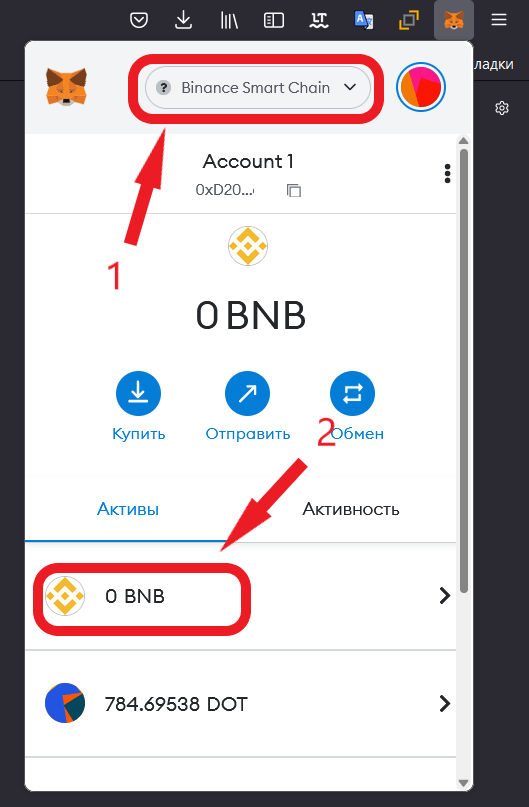
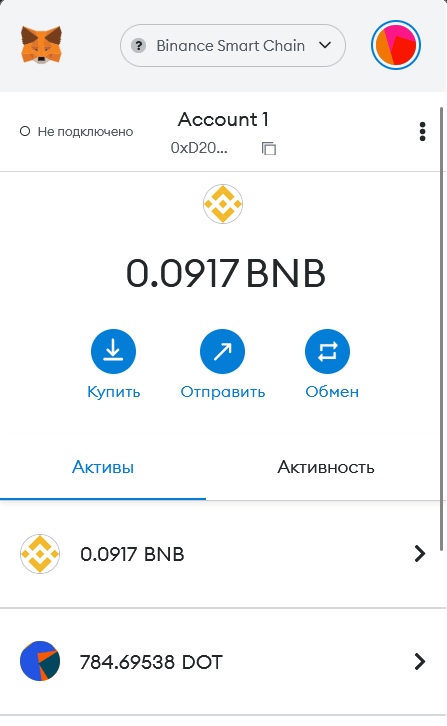
- Видим, что количество BNB на нашем счете равно нулю. Причем здесь BNB, если нам нужно перевести монеты DOT (или любые другие)? Дело в том, что комиссия в сети BSC оплачивается в токенах BNB. Поэтому нам нужно иметь хотя бы небольшое количество данных монет на счете. Откуда взять BNB? Данную монету можно купить или обменять (из имеющихся, к примеру обменять небольшую часть dot на bnb) в самом Metamask. Но мы для примера купили их на спотовом рынке через Binance, а затем отправили на Metamask.
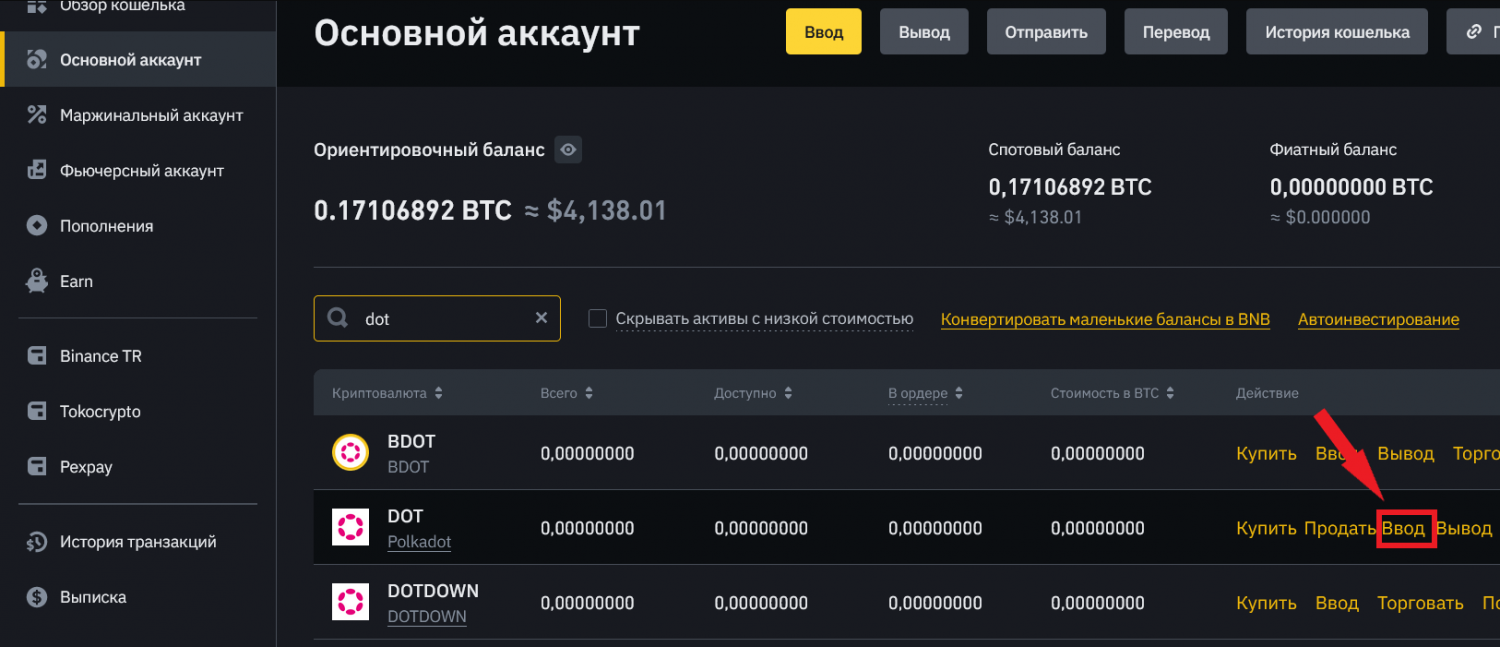
- Теперь нам нужны реквизиты, куда планируется осуществить перевод. Заходим на сайт или в мобильное приложение Binance, выбираем основной аккаунт, находим нужную монету и выбираем блок "Ввод".
- Выбираем сеть BEP20, после чего появится адрес, нужно его скопировать.
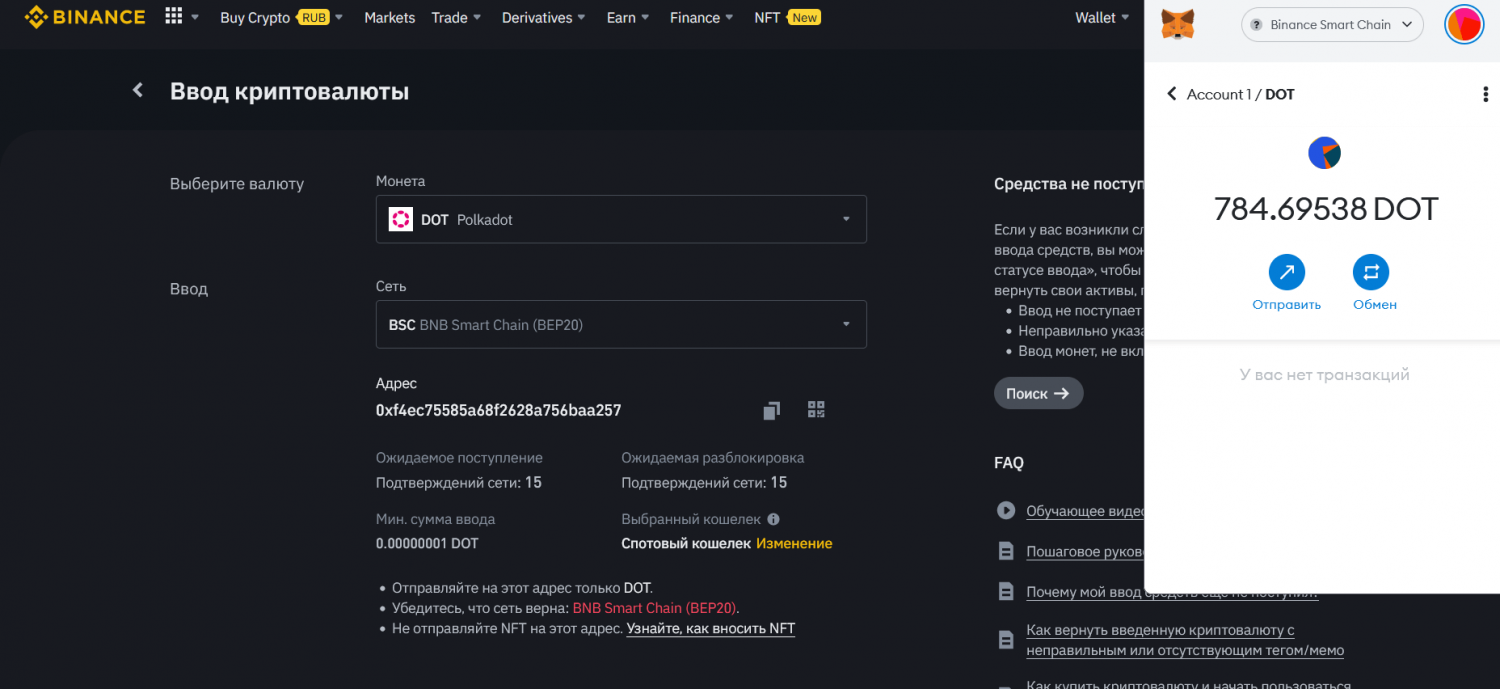
- Возвращаемся к Metamask, выбираем нужную сеть и токен, нажимаем на кнопку отправить. На открывшейся странице указываем скопированный ранее адрес, затем вписываем сумму монет, которую хотим перевести. Ниже появится информация о цене за газ (GWEI), финальный размер комиссии будет указан позже. Поэтому следует нажать на далее.
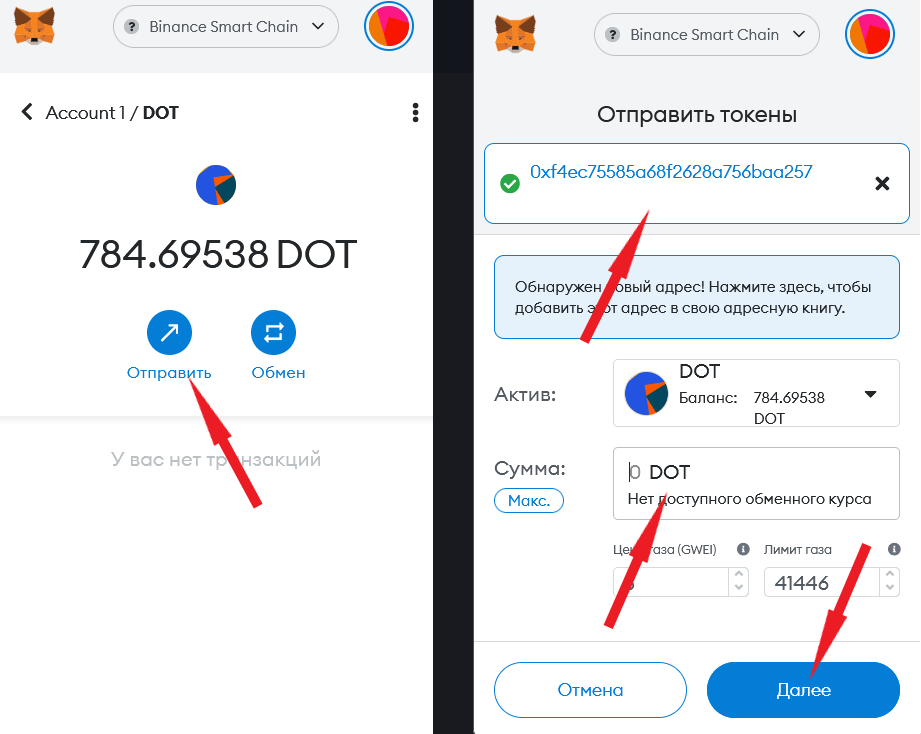
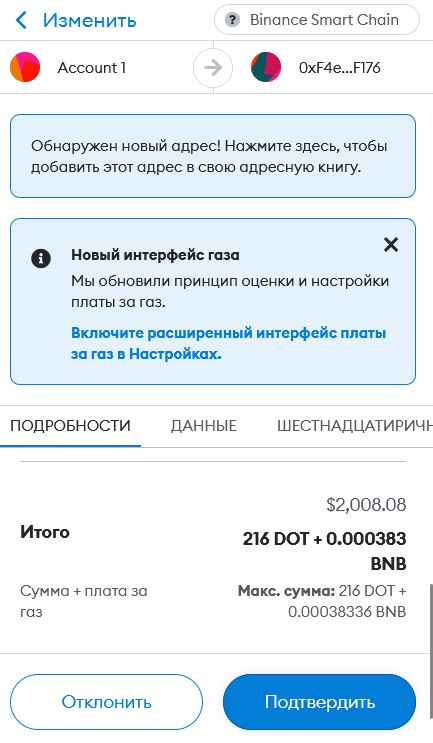
- Размер комиссии зависит от загруженности сети. В нашем случае за перевод 216 монет ДОТ (на тот момент чуть больше 2000 долларов) комиссия составила 0.000383 BNB (в районе $0.10)
- Средства на биржу Бинанс поступили в течение 1 минуты, транзакцию можно проверить на сайте bscscan.com.
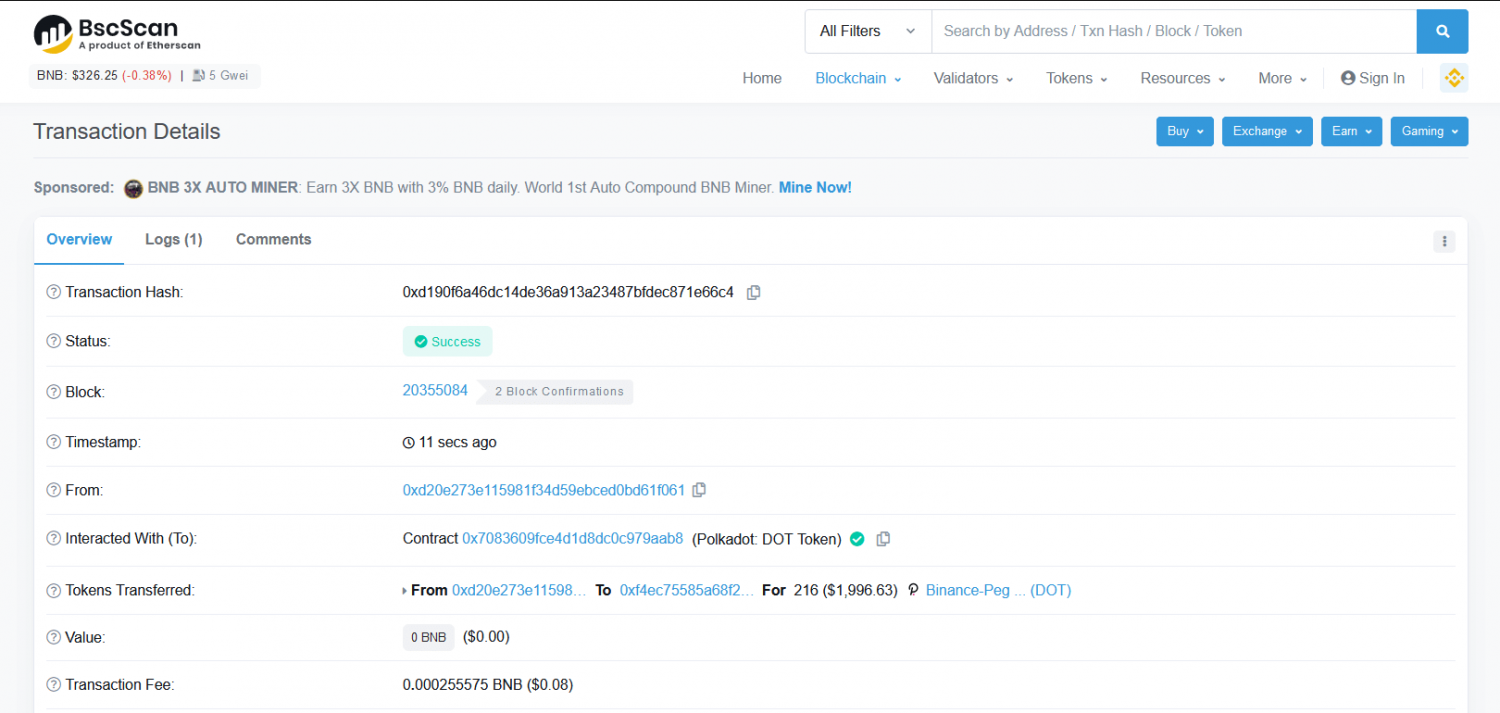
Как видим, процесс предельно прост, главное не ошибиться с адресом и сетью — что является самой распространенной причиной утери средств ��.
(1) Installing and setting up MetaMask

MetaMask can be downloaded on Chrome and Firefox, or on iOS and Android if you’re a mobile user. For the purposes of this tutorial, we’ll use the Firefox version, but the instructions will be more or less the same for every platform.
Firstly, you’ll want to head over to the MetaMask Download page. From there, select whichever platform you’re using, and follow the steps to install it on your device. Easy!
Next, follow along with the setup specified by the app. Go ahead and click Create a Wallet. Write down the backup seed phrase somewhere secret (preferably not on an Internet-connected device). Without this phrase, your funds can’t be recovered if your device is damaged or lost. Confirm that you’ve written them down on the next page.
And that’s it! You should now see your wallet, ready to send and receive funds.
The freshly-initialized MetaMask wallet.
(2) Configuring the wallet
You might notice straight away that we’re still dealing with an Ethereum wallet. At best, this won’t work with Binance Smart Chain DApps. At worst, you could lose funds by sending them to addresses you can’t actually use.
Let’s change that. We want to access the Settings to point the wallet towards Binance Smart Chain nodes.
Select Settings from the dropdown menu.
On the Settings page, we want to locate the Networks menu.
The Networks menu.
We want to click Add Network in the top-right corner to manually add the Binance Smart Chain one — it doesn’t come packaged with MetaMask. It’s important to note that there are two networks we can use here: the testnet or the mainnet. Below are the parameters to fill in for each.
(3) Mainnet (This is the one you are probably looking for)
Network Name: Smart Chain
ChainID: 56
Symbol: BNB
Block Explorer URL: https://bscscan.com
2. Adding BUSD and KOI tokens
(1) Adding BUSD Token
A. Select the Smart Chain main network at the top of the wallet and click the “Add Token” button
B. Find the contract address of BUSD (0xe9e7cea3dedca5984780bafc599bd69add087d56) in the bscscan.com browser, copy it to the Token Contract Address, and click NEXT
C. Click “Add Token” to add the BUSD token displayed in the wallet
(2) Adding KOI Token
A. Click Add Token at the bottom of the wallet
B. Find the contract address of KOI (0x49158d0c9d39d74b57c3dcb14a442211745777f4) in the bscscan.com browser, copy it to the Token Contract Address, and click NEXT
C. Click “Add Token” to add the KOI token displayed in the wallet
D. Both BUSD and KOI were successfully added to MetaMask’s wallet.
How to Add BUSD in Metamask Binance Smart Chain Wallet

Have you sent your BUSD to the Metamask wallet and it’s not showing in Metamask. The BUSD withdrawal successful but is not showing in Metamask. Here is a step-by-step solution to fix BUSD that is not showing in the Metamask wallet by adding BUSD in Metamask wallet. Every token has a specific contract address, which defines that specific cryptocurrency. You just have to use that and add your token in Metamask to see your deposited cryptocurrency like BUSD.
You can buy BUSD from Binance exchange or if you want to buy with INR you can use WazirX, Bitbns.
Interested in new ICOs? Bookmark our this page and get updated with potential upcoming ICOs.
How to add BUSD in Metamask
Every token has a contract address by which they get their notation and their existence. Just like that, you have to add every token with their contract address in Metamask. Metamask then lists that token and shows it to you. If you already had deposited the tokens like in this case BUSD you will see your tokens. First, if the token isn’t there in Metamask that means it’s hidden. Use the guide to add a token in Metamask Binance smart chain wallet.
Here is a step-by-step guide to Add BUSD in Metamask Binance Chain Wallet
Step I – Open your Metamask wallet. Change the network to Binance Smart Chain.
Step II – Click on Add Token and then add 0xe9e7cea3dedca5984780bafc599bd69add087d56 as contract address. Now, everything else in the form will get automatically get filled. The token symbol will get automatically picked if it’s the popular one like BUSD.
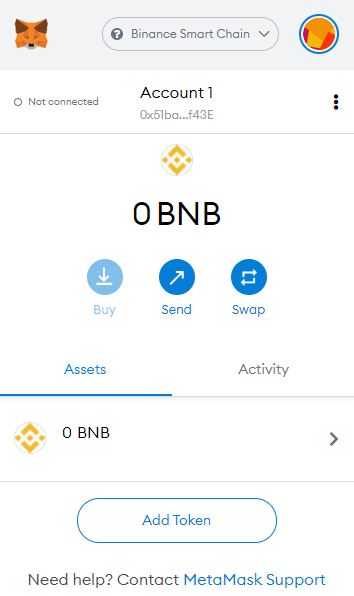 Click Add token to add BUSD to Metamask wallet
Step III – Now click on the Next and it will automatically get updated. After that, your BUSD token will be visible to your Metmask wallets.
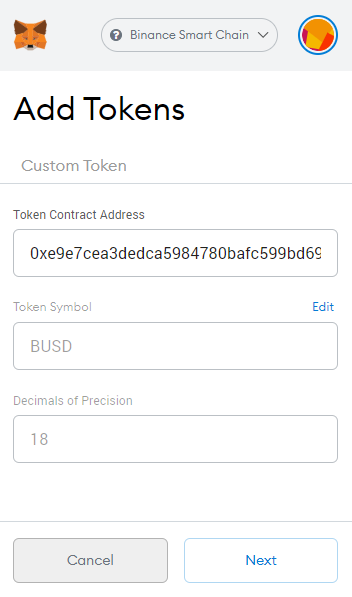 Add BUSD contract address to show token in Metamask Binance Smart Chain wallet
Key Takeaway
You can add as many tokens in Metamask binance smart chain wallet just by using those token’s contract addresses. Use the above step-by-step guide to add BUSD in Metamask wallet or any other token. Search the token name at https://bscscan.com/ and then copy the contract address from there. Use this contract address in the Metamask wallet to make that token visible to you.
Related posts:
USDT/Tether is created on the OMNI chain. OMNI chain is.
Hi, welcome to this ultimate guide on how to use.
Binance recently airdropped TWT tokens to its users who had.
Covalent consider themselves richest blockchain data on the internet. Anyone.
MetaMask is a plugin for Google Chrome browser. It can.
Harvest Finance is staking and yielding platform that let users.
How to add BUSD to your MetaMask
The first NFT LAND Sale on Polkastarter is here. Let’s get everything ready for March 8.
- Share on Twitter
- Share on Facebook
- Share on LinkedIn
- Share on Pinterest
- Share via Email
- Copy link
The Cryptoverse NFT LAND sale will be on BUSD on BNB Chain (BNB), so in order to participate, you’ll need to add BUSD to your MetaMask wallet.
If you are not sure how to buy BUSD, we’ve got you!
Here’s a quick tutorial on how you can buy BUSD to participate in the Cryptoverse sale on March 8.
Before you Start
You will need the BUSD token to participate in the Sale and to hold BNB in order to pay the network fees.
The next step will be how to add it to your MetaMask wallet and make sure its connected and funded before participating in the Polkastarter x Cryptoverse NFT LAND sale.
How to add BUSD in Metamask
First of all, if you don’t have a MetaMask account here’s a quick tour of your first steps:
1. Download MetaMask from their official website.
They have a browser extension that works on Chrome, Firefox, Brave and Edge, and a mobile iOS and Android app.
2. Create a wallet by following the instructions.
Once you get to the backup seed phrase, make sure to write it down on a piece of paper rather than storing it on your computer or phone.
3. Congratulations!
You’ve just created a MetaMask account. It should look something like this:
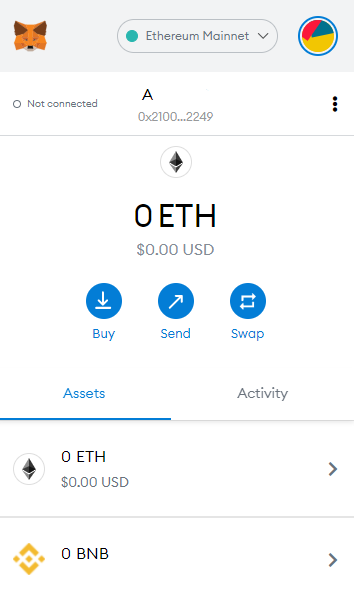
How to add the BNB Chain Network (Binance Smart Chain) to MetaMask
The first thing you’ll need to do is change your Network to BNB Chain Network (Binance Smart Chain), follow this link to learn how.
Then, you’ll need to add BUSD token to your wallet.
There are two ways you can do it:
1. Click on ‘Add token’ and copy-paste the BUSD token contract address: 0xe9e7CEA3DedcA5984780Bafc599bD69ADd087D56
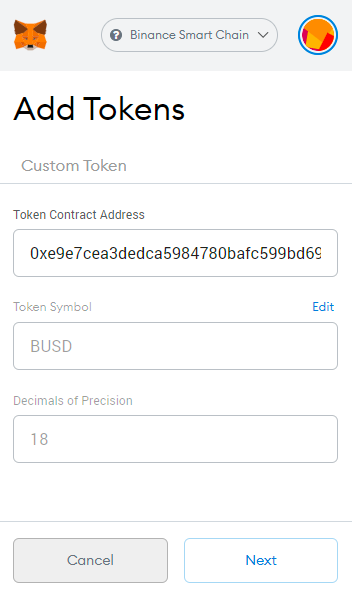
2. You can go to CoinGecko and on BUSD page click on the MetaMask icon to automatically add it to your wallet.
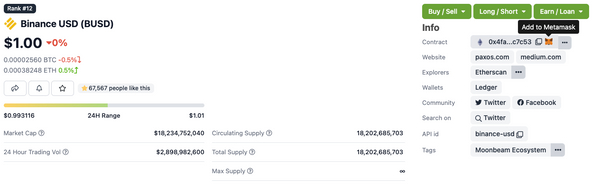
Now that the BUSD token is visible on your MetaMask wallet you’re ready to start!
To participate in the NFT LAND Sale, you’ll need to send the BUSD token to your MetaMask and make sure you have BNB there to cover all the necessary fees.
Here’s how you can do that:
1) Buy BUSD via an exchange. The token is listed on many exchanges such as Binance, Gate.io, KuCoin, and Pancakeswap.
2) Send it to your Metamask account on the BNB Chain Network. Where it says “Address”, put your address.
Check the image below to know how to find your address
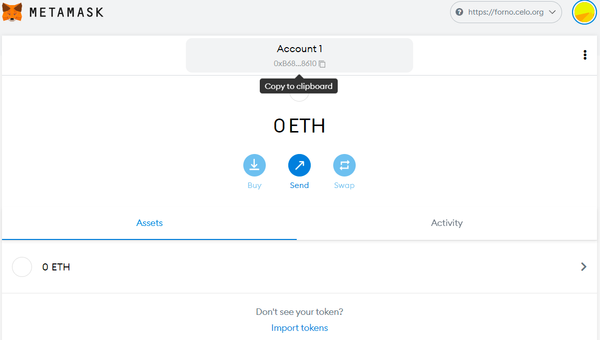
3) Send BUSD to your MetaMask
4) All Done! Now you can participate in Cryptoverse NFT LAND Sale on Polkastarter. ��
About Polkastarter
Polkastarter is the fully decentralized protocol for launching new ideas. Our curation process and industry access enable us to offer the best new projects in blockchain and digital assets.
With Polkastarter, decentralized projects can raise awareness, build a loyal community, and receive long-term support. Users of the platform will be able to participate in a secure and compliant environment and use assets both in and beyond the current ERC20 standard, namely BNB and Polygon (MATIC) tokens.
Connect with us and learn more about Polkastarter
Website | Twitter | Discord | Telegram | Instagram | Newsletter