How To Find Your Trust Wallet Recovery Phrase (And Backup)
One of the main advantages of non-custodial wallets like Trust Wallet over centralized crypto exchanges like Binance, Coinbase, Kucoin, and the likes is the fact that you have full control over your crypto assets since Trust Wallet hands over your private keys to you when you create a wallet.
While this is a good thing since you won’t be able to lose your funds due to exchange hacks, regulatory issues, account suspension, and more, the bad side to this is that you are fully responsible for the security of your wallet and all the crypto assets stored on it.
One of the best ways to keep your wallet safe on platforms like Trust Wallet is to safely back up your recovery phrase and in this article, we will show you how to find your Trust Wallet recovery phrase as well as various methods to back it up safely.
What Is A Recovery Phrase On Trust Wallet?
When it comes to cryptocurrencies and any blockchain, there are two very important keys to take note of when you create a new wallet. The first is the wallet’s public key which is also known as your wallet address and the second is the private key which can be used to assess the wallet and should be kept PRIVATE at all times.
Since the private key is just a bunch of random letters and numbers, most crypto wallets have come up with another way to encode and decode your private key via a 12-word recovery phrase.
A recovery phrase is a 12-word phrase that is essentially your private key in a human-readable form. Crypto wallets can decode a recovery phrase to get the private key then the private key can be used to access the said wallet.
So in simple terms, your Trust Wallet recovery phrase is the key to your wallet. Since Trust Wallet does not offer anything like usernames, passwords, 2-step verification, or anything of that nature, you can only access your wallet using the 12-word recovery phrase of the wallet and if you lose it, you have essentially lost access to the wallet and the assets stored in it.
How To Find & Backup Your Recovery Phrase On Trust Wallet Quickly
- Launch the Trust Wallet app on your phone.
- Tap on the Settings icon.
- Next, tap on [Wallets].
- Select the 3-dot icon next to the wallet you want to find its recovery phrase.
- Tap on [Show Recovery Phrase].
- Tick [I understand the risks] and tap on [CONTINUE].
- Finally, tap on [COPY] to copy your Trust Wallet recovery phrase.
How To Find Your Trust Wallet Recovery Phrase (Step By Step Guide)
To find your Trust Wallet recovery phrase, you need to be logged into your wallet on Trust Wallet. If you have lost access to your wallet, you cannot find your recovery phrase on Trust Wallet.
Here is a step-by-step guide on how you can find your recovery phrase on Trust Wallet.
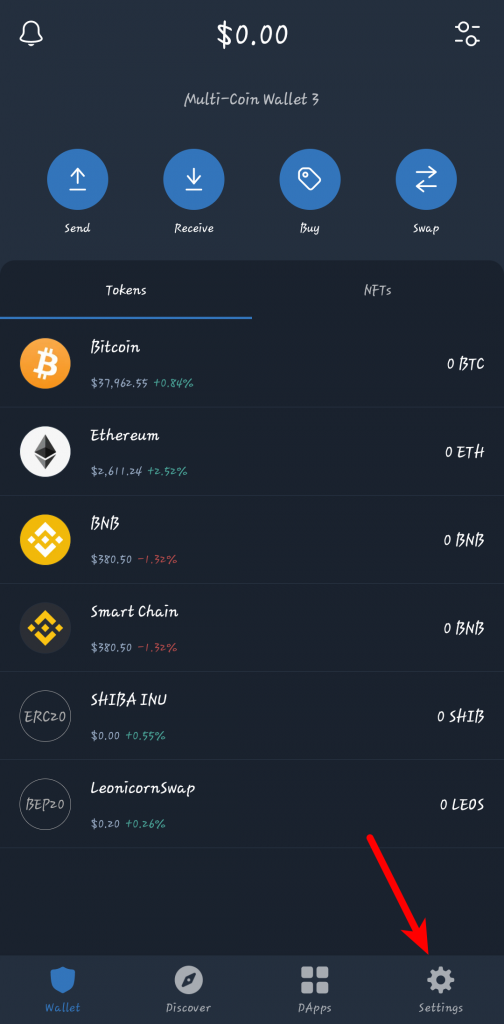
Step 1: Launch the Trust Wallet app and tap on [Settings].
Launch the Trust Wallet app on your mobile device and tap on the [Settings] icon which can be found at the bottom right corner of the screen.
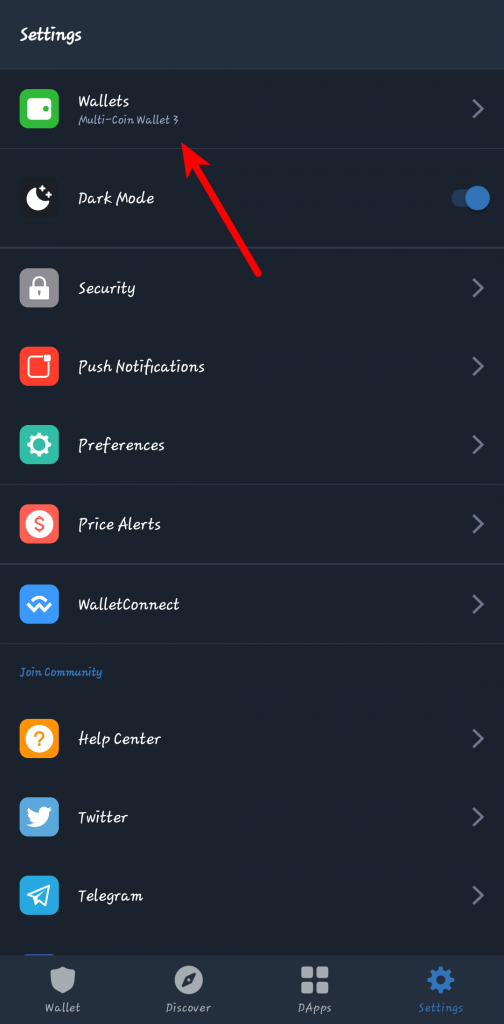
Step 2: Select [Wallets].
On the Trust Wallet settings tab, select [Wallets] to view all available wallets on your account.
Step 3: Tap on the 3-dot icon next to the selected wallet.
Once you can see a list of all your wallets, tap on the 3-dot icon next to the wallet you want to copy its recovery phrase.
Note: On the Trust Wallet app for iPhone, you will have to tap on the info icon next to the wallet and not the 3-dot icon since there is no 3-dot icon.
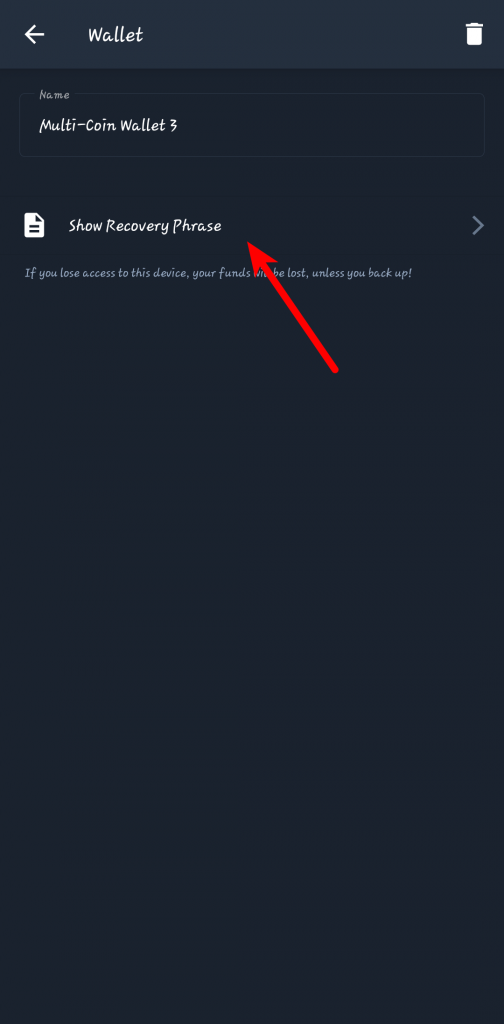
Step 4: Tap on [Show Secret Phrase].
On the next page, tap on [Show Secret Phrase] to show the recovery phrase of the wallet.
Step 5: Agree to the risks associated with your recovery phrase.
Now, tick the checkbox which says [I understand the risks] and tap on [Continue] to view the recovery phrase.
Step 6: Tap on [COPY] to copy your recovery phrase.
Finally, tap on [COPY] to copy your Trust Wallet recovery phrase to your device clipboard.
With this, you have successfully found (and copied) your recovery phrase on Trust Wallet.
What Are The Best Ways To Safely Backup Your 12-word Recovery Phrase?
Getting full control over your wallet by having the private key (in form of a 12-word seed/recovery phrase) comes with its advantages and of course, disadvantages!
One of the major disadvantages of storing your crypto on non-custodial wallets is that anyone who has access to your seed phrase has FULL unrestricted access to your wallet.
This means that if someone finds your recovery phrase by hacking, scams, phishing attacks, social engineering attacks, and the likes, they can steal any (and all) crypto assets on the wallet and in many cases, without getting caught.
To prevent this, it is recommended that you store your recovery phrase safely and avoid sharing the phrase with anyone at all.
Below are some of the recommended ways to safely back up your 12-word recovery phrase.
1) Plain old pen & paper style
Everything connected to the internet can be hacked so the best way to protect yourself from hacks is to go fully offline.
Writing down your recovery phrase on paper with a pen is the best way to safely back it up away from the internet but this comes with its risks too – fires, water damage, thieves, and more.
To add an extra layer of protection when storing your recovery phrase offline via a pen and paper, you can invest in getting a good safe or a lock box at the bank.
You can also divide the recovery phrase into multiple parts say two or three parts and store each part in different locations for tougher security.
2) On an unsynced note-taking app
Another way to store your recovery phrase securely and offline is to simply use the note-taking app on your device.
We recommend that you use an unsynced note-taking app – i.e a note-taking app that doesn’t connect to the internet – for increased security.
Most smartphones come with note-taking apps pre-installed and you can use any of these apps on your device. Some note-taking apps also feature added security by allowing you to create password-protected notes so you can also take advantage of that if the note app you use has the feature.
Storing your recovery phrase comes with its risks one of which is that if you misplace your device or it gets stolen/damaged, you will lose access to the recovery phrase so we recommend that you also backup your recovery phrase using other (secure) methods in addition to keeping it on your notes app.
3) Via password managers
Password managers are also one of the recommended ways to store your recovery phrase securely. These password managers will store an encrypted version of your recovery phrase directly on your local storage, on the cloud, and in some cases, both.
Password managers which connect to the internet and store encrypted versions of passwords and other data on the cloud can and have been hacked in the past, so storing your recovery phrase on a password manager also comes with some risks.
That said, password managers offer a reasonable amount of protection over malicious third parties. Some of the recommended (and popular) password managers you can try out include LastPass, 1Password, KeePassXC, and Nordpass.
Can You Change Your Trust Wallet Recovery Phrase?
No, you cannot change your Trust Wallet recovery phrase, no one can.
If you are positive that the recovery phrase of your wallet has been compromised, you can create another wallet on Trust Wallet and transfer all your crypto assets from the compromised wallet to the new one.
When you create a new wallet on Trust Wallet, you will get a fresh 12-word recovery phrase which you can then use to access your new wallet. So far you keep the recovery phrase of the new wallet safe, the crypto assets you transferred there will be safe.
Once you have successfully transferred all your assets from the old wallet to the new one, you can delete the old wallet on Trust Wallet.
Why Is My Trust Wallet Recovery Phrase Not Working?
Your Trust Wallet recovery phrase doesn’t work because it is not correct. If you’re getting errors while trying to import your wallet to Trust Wallet using the recovery phrase, it could be because the recovery phrase is wrong or has a mix-up in the words that make up the phrase.
Sure that the recovery phrase is correct? Then cross-check with your backup to see if both match. If they both match and your recovery phrase still doesn’t work, try clearing the Trust Wallet app cache or simply uninstall the app and re-install then try again.
Wrapping Up
To find your recovery phrase on the Trust Wallet app, you need to be able to access the wallet on the Trust Wallet app where you can copy the recovery phrase easily.
If you lose your recovery phrase and access to the wallet on the Trust Wallet app, then you may have completely lost access to the wallet and the assets stored on it unless you can find the recovery phrase.
Unlike centralized exchanges like Binance, Coinbase, etc where you can simply change your password if you lose it using your email on phone number, that doesn’t work on Trust Wallet since it is a non-custodial wallet.
If you landed on this page because you were searching for a way to find or recover your Trust Wallet recovery phrase, we hope you found this article helpful.
Часто задаваемые вопросы о Trust Wallet
Trust Wallet является популярным криптовалютным кошельком, который предоставляет пользователям удобный и безопасный способ хранения, отправки и получения различных криптовалют и токенов. В этом разделе FAQ мы ответим на некоторые наиболее часто задаваемые вопросы о работе с Trust Wallet, чтобы помочь вам лучше понять основные функции кошелька и как им воспользоваться.
Как вывести деньги с Trust Wallet?
Для вывода денег с Trust Wallet отправьте криптовалюту на другой кошелек или на обменный сервис, который позволяет конвертировать криптовалюту в фиатную валюту. Затем обменяйте криптовалюту на фиат и выведите средства на свой банковский счет или карту через выбранный обменник.
Как пополнить Trust Wallet?
Для пополнения Trust Wallet вам необходимо получить адрес кошелька для нужной криптовалюты внутри приложения. Затем отправьте криптовалюту на этот адрес с другого кошелька или обменника. Транзакция будет завершена после получения подтверждений в соответствующей блокчейн-сети.
Как установить Trust Wallet?
Для установки Trust Wallet перейдите в Google Play Store (для Android) или Apple App Store (для iOS). Найдите Trust Wallet среди предложенных приложений и нажмите «Установить» или «Install». После завершения установки откройте приложение и следуйте инструкциям для настройки кошелька.
Как создать Trust Wallet?
После установки приложения Trust Wallet откройте его и выберите опцию «Создать новый кошелек» или «Create a new wallet». Согласитесь с условиями использования и просмотрите мнемоническую фразу (сид-фразу). Запишите сид-фразу в безопасном месте, так как она необходима для восстановления вашего кошелька. Затем подтвердите фразу, следуя указаниям, и ваш кошелек будет создан.
Как добавить USDT в Trust Wallet?
Для добавления USDT в Trust Wallet откройте приложение, нажмите на значок «+» в верхнем правом углу экрана и найдите «Tether (USDT)» в списке поддерживаемых токенов. Нажмите на USDT и переключите кнопку «Активировать» или «Enable» рядом с ним. Теперь USDT будет отображаться в вашем кошельке, и вы сможете видеть свой адрес для приема и отправки токенов USDT.
Как восстановить Trust Wallet?
Для восстановления Trust Wallet на новом устройстве или после удаления приложения установите Trust Wallet снова и выберите опцию «Восстановить кошелек» или «Import a wallet» при первом запуске. Введите вашу мнемоническую фразу (сид-фразу) из 12, 18 или 24 слов в указанном порядке и следуйте инструкциям. Ваш кошелек и все связанные с ним активы будут восстановлены.
Является ли Trust Wallet безопасным кошельком?
Да, Trust Wallet считается безопасным кошельком, поскольку он является децентрализованным и не хранит приватные ключи на своих серверах. Вместо этого приватные ключи шифруются и хранятся на устройстве пользователя. Важно сохранять свою сид-фразу в безопасном месте и не делиться ею ни с кем, чтобы обеспечить максимальную безопасность.
Как работает кошелек Trust?
Trust Wallet предоставляет пользователям возможность хранить, отправлять и получать различные криптовалюты и токены. Он поддерживает множество блокчейн-сетей и позволяет пользователям управлять своими приватными ключами. Trust Wallet также имеет встроенный DApp-браузер для доступа к децентрализованным приложениям и поддерживает функции стейкинга и децентрализованных финансов (DeFi).
Как вывести деньги из Trust Wallet?
Чтобы вывести деньги из Trust Wallet, отправьте криптовалюту на другой кошелек или обменник, который позволяет конвертировать криптовалюту в фиатную валюту. Затем обменяйте криптовалюту на фиат и выведите средства на свой банковский счет или карту через выбранный обменник.
Взимает ли Trust Wallet комиссию?
Trust Wallet сам по себе не взимает комиссии за отправку или получение криптовалюты. Однако, при выполнении транзакций вам придется заплатить комиссии сети (газовые сборы), которые идут в качестве вознаграждения майнерам или валидаторам за обработку и подтверждение транзакций.
Можно ли взломать трастовый кошелек?
Trust Wallet считается безопасным кошельком, поскольку он не хранит приватные ключи на своих серверах и шифрует их на устройстве пользователя. Однако, как и любой другой кошелек, Trust Wallet может быть уязвимым перед атаками, если пользователь не предпримет необходимых мер безопасности, таких как сохранение сид-фразы в безопасном месте и использование надежных паролей.
Можно ли украсть средства из Trust Wallet?
Теоретически, средства в Trust Wallet могут быть украдены, если злоумышленники получат доступ к вашей сид-фразе или приватным ключам. Поэтому важно хранить вашу сид-фразу в безопасном месте, не делиться ею с кем-либо и использовать дополнительные меры безопасности, такие как аутентификация на основе биометрии и устройство с хорошей защитой.
Web server is returning an unknown error Error code 520
There is an unknown connection issue between Cloudflare and the origin web server. As a result, the web page can not be displayed.
What can I do?
If you are a visitor of this website:
Please try again in a few minutes.
If you are the owner of this website:
There is an issue between Cloudflare’s cache and your origin web server. Cloudflare monitors for these errors and automatically investigates the cause. To help support the investigation, you can pull the corresponding error log from your web server and submit it our support team. Please include the Ray ID (which is at the bottom of this error page). Additional troubleshooting resources.
Cloudflare Ray ID: 80f2ef9cb269b379 • Your IP: Click to reveal 45.84.122.27 • Performance & security by Cloudflare
How To Restore Trust Wallet?
Trust wallet is a popular decentralized wallet for users to store, manage and transact cryptocurrencies. The mobile application also provides multiple features like enabling access to DApps. This makes it important to backup your Trust Wallet so that you can restore it and your assets anytime.
The app provides a 12-word recovery phrase for this purpose. It is a private key that restores access to your Trust Wallet just like a PIN used to access your account.
What Is A Trust Wallet?
Trust Wallet is basically a mobile application that allows users to store, manage and trade cryptocurrencies. The users can manage up to 160 digital assets on the app.
It also has a fully functional web3 browser that users use to access DApps to exploit Defi world, NFTs, or play blockchain games. The app provides access to over 40 blockchains.
How Does Trust Wallet Work?
Trust wallet is a mobile software application that stores the private keys to your crypto holdings.
Your Trust wallet records all the transactions using two keys, i.e., a private key and a public key. Your private key acts like a transaction pin that gives you access to your wallet. For each asset you store in your wallet, a public key is associated with it.
This public key is like the account number that you send to others to receive money. Here, you send it to receive cryptos. That same asset is also associated with a private key which is needed to sign-off transactions.
What Is A Recovery Phrase?
It is a human-readable form of the private key of your wallet that can be used to sign in your transactions and claim ownership to the address of the wallet. Just like your email credentials, the recovery phrase needs to be kept securely at a hidden location.
You may lose your crypto if someone discovers your recovery phrase because the other person will be able to access your wallet.
How To Find Recovery Phrase In A Trust Wallet?
Steps to Find Recovery Phrase In a Trust Wallet:
- Step 1: First, open your Trust Wallet app and click on settings.
- Step 2: After going to settings, tap on Wallets. A screen will display different wallets that you are currently having.
- Step 3: In case you have multiple wallets, tap on the wallet for which you want to find the recovery phrase and tap on the ‘i’ symbol.
- Step 4: Move to tap on ‘show recovery phrase for your wallet’.
You will be able to see your recovery phrase. Further, you can move ahead to copy it in the order that it is and note it down somewhere. Lastly, store it so that you don’t lose it. In Trust Wallet, there is a QR code, which you can scan to get your recovery phrase.
How To Restore Trust Wallet?
For restoring an existing wallet, you must have access to the recovery phrase. Usually, wallets have a 12-word recovery phrase that performs like a key to your wallet.
So, you must keep them safe. Recovery phrases are portable and enable the user to transfer their wallet from one self-custody to another.
By recovering an existing wallet using the recovery phrase, you can continue using your wallet.
The steps to follow are:
- Step 1: Install the Trust Wallet application on your device and launch the application.
- Step 2: Select “I already have a wallet.”
- Step 3: Select the wallet type you were using before, multi-coin wallet or Ethereum.
- Step 4: Enter the 12-word recovery phrase.
- Step 5: Click on “import.”
How To Change Trust Wallet Recovery Phrase?
You can not change Trust Wallet Recovery Phrase. Because the recovery phrase holds the key to crypto, the address of the wallet is fixed to a specific set of words.
It cannot be changed through any process. However, you can consider creating a new wallet and transferring your funds to your new wallet. After creating the new wallet, delete the previous one.
Conclusion
Trust Wallet is among the popular wallets for the benefits it provides along with security. To ensure security to your funds, it has employed the 12-word recovery phrase that is stored on your device itself.
Having this recovery phrase is important because if you ever lose your phone or it gets damaged, you’ll be able to access your assets again. Otherwise, you will lose it all.
The restore process is pretty straightforward which involves the use of the recovery phrase. And, within a few seconds, your wallet is back with you with all assets intact.
Frequently Asked Questions
What Will Happen If I Lose My Recovery Phrase?
If you have lost your recovery phrase or have written it incorrectly, you’ll be unable to restore access to the Trust wallet. So, you’ll lose all your funds.
How Do I Save Recovery Phrase?
You can write your 12-word recovery phrase on a paper. If you feel you need something more durable than paper, you can consider apps like CRYPTOTAG. You can also store it in a password manager or on the note-taking apps on your phone. Whatever you do, make sure you have a backup of your backup.