Как перенести USDT с Binance на OKX или Huobi
Вы не поверите, но 25 августа Binance ограничил операции для резидентов РФ на P2P– теперь продать USDT за турецкие лиры или какую-нибудь другую иностранную валюту не получится. Но мы уже выпустили два гайда по альтернативным криптобиржам – OKX и Huobi.
Этот гайд – для тех людей, у которых на Binance «зависли» деньги. Рассказываем, как перевести их с этой криптобиржи на OKX или Huobi.
Так что делаем-то?
Общий маршрут такой: мы будем переводить USDT по криптовалютной сети Tron (TRC20). Чтобы отправить перевод, вам нужно знать адрес получателя.
Поэтому общий маршрут такой:
Находите адрес вашего криптокошелька на бирже OKX или Huobi;
На Binance отправляете деньги на этот криптокошелёк.
Важная деталь: за эту транзакцию снимается комиссия в размере 1 USDT. Перевод придёт через 1–2 минуты (иногда минут через 10, в зависимости от загруженности сети).
Находим адрес криптокошелька на OKX
Как и почти всё в нашей жизни, это удобнее делать через приложение:
На главном экране нажмите кнопку «Активы» с иконкой кошелька;
Перейдите во вкладку «Основной» в верхнем меню;
Нажмите кнопку «Пополнить»;
В меню «Выбор способа депозита» выберите «Криптовалюта»;
В списке криптовалют выберите USDT;
В меню «Выберите сеть для депозита» выберите USDT-TRC20.
В строке «Адрес депозита» находится ваш адрес криптовалютного кошелька. Скопируйте его – там рядом соответствующая кнопочка есть.
Как выглядит этот адрес для депозита:

На скриншоте – адрес автора статьи. У вас будет свой собственный.
Находим адрес криптокошелька на Huobi
Аналогично, всё делаем через приложение Huobi:
На главном экране нажмите «Активы»;
На экране кошелька нажмите «Депозит»;
Убедитесь, что выбраны токены. Найдите USDT;
На экране «Выберите сеть депозита» выберите TRC20.
Вы увидите ваш адрес прямо под QR-кодом. Нажмите кнопку «Скопировать адрес», чтобы, соответственно, скопировать адрес.
Как выглядит этот адрес для депозита:

На скриншоте – адрес автора статьи. У вас будет свой собственный.
Отправляем деньги из Binance
И снова через приложение, только приложение Binance:
На главном экране нажмите «Кошелёк»;
Перейдите в тот кошелёк, в котором у вас деньги. Если вы пополняли Binance через P2P, то деньги у вас в кошельке «Пополнения». Если вы криптовалютный трейдер со спотовыми активами, то зачем вам эта статья? Но тогда отправляйте из спотового кошелька – там без разницы;
Нажмите кнопку «Вывод средств»;
В меню «Вывод средств» выберите «Отправить через крипто-сеть»;
На экране «Отправить USDT» нажмите на «Сеть» и на открывшемся экране выберите Tron (TRC20). Он в самом низу списка;
В строку «Адрес» укажите адрес, который вы получили в OKX или Huobi;
В строке «Сумма» введите сумму, которую вы хотите перевести в другую криптобиржку;
Деньги придут через 1–2 минуты. Может, немного позже.
Как выглядит экран перевода:

Минимальный лимит вывода – 2 USDT. Однако в периоды, когда сеть перегружена (например, 26 августа, потому что деньги почему-то начали утекать из Binance), он может быть увеличен. Если у вас на кошельке меньше USDT, чем на минимальном лимите – попробуйте сделать всё то же завтра, послезавтра или через пару дней.
Как перевести usdt на huobi
[WEB]Руководство для Начинающих Трейдеров по Копи-Трейдингу

Huobi Copy Trading предлагает пользователям простой и прозрачный способ копирования отличных стратегий. Как начинающие, так и опытные трейдеры могут выиграть от подобного взаимодействия при копировании сделок.
При трейдинге с копированием сделки подписчиков повторяют сделки копируемых ими трейдеров, чтобы получать одинаковую доходность, в то время как копируемые трейдеры получают долю прибыли своих подписчиков.
Как Начать Copy Trading на Huobi (для трейдеров)
Это руководство по торговле фьючерсами с копированием сделок поможет вам начать свой путь в трейдинге с копированием на Huobi.
На веб-сайте Huobi
Шаг 1: Нажмите Деривативы > Copy Trading на верхней панели навигации, чтобы перейти на страницу Copy Trading.

Шаг 2: Вы можете просматривать информацию о трейдерах, такую как Лидеры, PnL (%), общий PnL и PnL подписчиков. Нажмите »Стать Трейдером», чтобы подать заявку на получение статуса копируемого трейдера.

Шаг 3: После одобрения вас в качестве копируемого трейдера, вы можете нажать «Мой Copy Trading», чтобы просмотреть соответствующую информацию и статистику о себе в качестве трейдера:
Информация о трейдере:
Показатели включают сегодняшнюю прибыль (USDT), суммарную прибыль (USDT), количество копирований, процент реализованных сделок и PnL (%).
Настройки: Вы можете установить ник, мои теги, режим трейдера, максимальное количество подписчиков и переключить режим.
Всего активов (USDT) и доступное к переводу количество (USDT).
Перевод, история переводов и торговля фьючерсами (отображаются после включения Режима Трейдера).
Текущие и прошлые позиции:
Текущие ордера, история, мои подписчики и потоки капитала.

Вы можете просмотреть сведения о своей позиции в Текущих Ордерах и закрыть текущие позиции, нажав кнопку »Закрыть».
(1) Нажмите на значок настроек и включите Режим Трейдера для активации себя в качестве трейдера.
(2) Завершите настройки трейдинга с копированием, выбрав процент прибыли, которым вы хотите поделиться, в разделе »Распределение прибыли» и нажав »Подтвердить».
(3) Поставьте отметку «Я прочитал и согласен с Соглашением зарегистрированного трейдера» и нажмите »Подтвердить», чтобы активировать себя в качестве трейдера.
Процент распределения прибыли: Вы можете выбрать между 10%, 15%, 20% или 25%. (Вы будете получать часть прибыли подписчиков, при ее наличии, после закрытия ими позиций в соответствии с предустановленным вами процентом распределения прибыли.)
Диапазон маржи для каждого ордера: 1 — 100 000 USDT. 
Шаг 5: Если на вашем счете Copy Trading нет активов, нажмите «Перевести», чтобы перевести USDT с вашего счета USDT-M Фьючерсы, введите сумму в USDT и нажмите «Подтвердить».

Шаг 6: Нажмите «История переводов», чтобы просмотреть историю ваших переводов USDT.

Шаг 7: Начните торговать фьючерсами.
(1) Чтобы перейти на страницу Copy Trading. Нажмите »Торговля Фьючерсами», чтобы начать торговлю. 
(2) Установите желаемое кредитное плечо, введите цену или выберите BBO или Best 20, введите сумму и установите значения тейк-профита и стоп-лосса
(3) Нажмите »Открыть Длин.» или »Открыть Корот.», чтобы разместить ордер.

*Режим ордера в трейдинге с копированием по умолчанию установлен в режим FOK (заполнить или уничтожить), чтобы обеспечить согласованность доходности между трейдером и подписчиками.
чтобы перейти на страницу Copy Trading

Поздравляем!Вы успешно разместили свой ордер.
Trade on the go with Huobi App (iOS/Android)
Huobi reserves the right in its sole discretion to amend or change or cancel this announcement at any time and for any reasons without prior notice. The above is for information purposes only and Huobi makes no recommendations or guarantees in respect of any virtual asset, product, or promotion on Huobi. Prices of virtual assets are highly volatile and trading virtual assets involves risk. Please read our Risk Reminder text here.
How to Transfer USDT from Binance to Huobi?

How to transfer Tether (USDT) from Binance to Huobi?
In this article, we’ll be showing how you can transfer Tether (USDT) from Binance to Huobi to trade cryptocurrencies that are listed on Huobi. Transferring USDT from Binance to Huobi is pretty simple, and a similar process can be applied for virtually any cryptocurrency that’s supported on both websites. In essence, you’ll have to withdraw assets from your Spot Wallet on Binance and deposit them to your Huobi account.
An introduction to Binance
If you consider daily volume, Binance is the biggest exchange in the industry. It offers a wide list of altcoins and a long list of trading features. Binance users can access different services including staking, lending, borrowing, margin trading, and more. The platform was established in 2017, the same year as the exchange’s native BNB went live. The exchange offers services to an international clientele and has headquarters in many countries of the world.
An introduction to Huobi
Huobi is a popular crypto exchange that launched in China in 2013. Today, Huobi has headquarters in various countries including Hong Kong, Japan and, the United States. Huobi boasts a massive number of supported coins, making it an excellent choice for short-term traders and long-term holders. Moreover, Huobi boasts high liquidity across virtually all of its trading pairs and allows users to invest in derivatives products in addition to spot markets.
A step-by-step guide
Transferring USDT from Binance to Huobi is not complex nor time consuming. The process is easy, and just requires just a bit of attention and precision. Follow our step-by-step guide if you are not familiar with transferring crypto between Binance and Huobi.
1. Get your USDT deposit address on Huobi
Go to the Huobi website and sign in to your account. Then, choose the Balances tab and select USDT. When you select USDT, there’s an icon for deposit. Click on the Deposit tab to continue.

Now, you will see the deposit address for USDT. Copy the address or scan the QR code.

USDT supports different chains like Ethereum (ERC20), TRON (TRC20) and Bitcoin-based Omni network (OMNI). Select the appropriate one according to your current needs. It is worth noting that many people use TRC20 for their transfers due to its high speed and low fee. The selected blockchain must be supported by both the Huobi and Binance exchange. Copy your USDT deposit address on your preferred chain- In our examples. we’ve picked the TRC20 USDT variety.
2. Withdraw USDT from Binance to the copied address
First, you need to have USDT in your Binance account. If you do, navigate to Fiat and Spot Wallet and click Withdraw tab.

Insert the address copied from Huobi and select the appropriate chain. You need to specify the amount that you want to transfer as well. If you choose TRC20 to transfer the fund, 1 dollar will be deducted as a transaction fee.
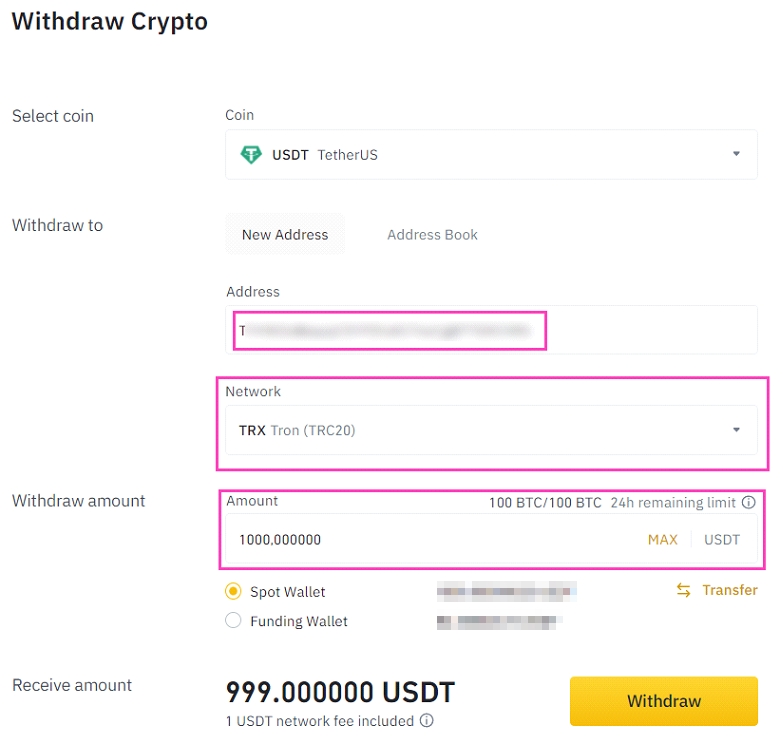
There are different security steps for withdrawal on Binance. You have to complete these steps, and after that, your withdrawal will be processed by Binance.

You can see the current status of your USDT withdrawal in your Binance transaction history. Once the withdrawal request is processed the status changes from «Awaiting Approval» to «Confirmed».

3. Check your USDT deposit on Huobi
Go back to Huobi and check your deposit. You get your deposit after a few confirmations. It usually takes a couple of minutes. Once the process is finished, the USDT deposit will be shown on your deposit history.

Further information
Here’s some additional information to consider if you’re trying to transfer USDT or any other cryptocurrency from Binance to Huobi.
Binance account verification
The USDT transfer process between Binance and Huobi is relatively easy and straightforward. But you have to be sure that your accounts are secure and verified. Also, double check that you’ve copied the correct deposit address and chosen the appropriate chain. Any carelessness will lead to the loss of funds. For more information about how to verify Binance account and complete the KYC process, click the link below.
Why would you want to transfer cryptocurrency from Binance to Huobi?
People transfer assets between exchanges for various purposes. For instance, some altcoins are only available on certain exchanges, and if you want to trade them, you need to transfer funds to that particular exchange. Furthermore, various crypto exchanges offer different services and features. Sometimes, you want to utilize a service that is not provided in your current exchange, which is where the intra-exchange crypto transfers can come in handy. It is worth noting that while you are transferring a coin from one exchange to another, you could lose some value due to inherent volatility of crypto assets. In this sense, stablecoins offer a great choice for transferring funds between platforms, since their value is stable.
Final thoughts
If you are transferring USDT from Binance to Huobi for the first time, try small amounts at first to make sure everything is working correctly. If you choose the wrong chain or copy the deposit address inappropriately, your money will be gone forever. As we’ve already mentioned before, transferring USDT between exchanges is not rocket science and requires only a bit of care and precision. Hopefully, this guide helped you move your USDT between exchanges!
Transferring Crypto to Your Huobi Account

Now that you’ve created your brand new Huobi account, it’s time to transfer some of your digital assets from your existing account(s) to your new Huobi account. Anyone can transfer you digital assets to your Huobi account as long as they have your deposit address. And with Christmas right around the corner, you should be ready for that tiny chance that a nice friend wants to give you some crypto. You can find your deposit address in three simple steps.
Step 1: Go to Balances
Go to ‘Balances’ at the top righthand corner of the screen. A dropdown menu will appear. Click on ‘Deposit & Withdraw’.
You will be redirected to the page as shown below.
Step 2: Select Your Preferred Digital Asset
As shown from the image below, there are many cryptocurrencies that are available for depositing, including BTC, ETH, USDT and HUSD. Select the cryptocurrency that you want to transfer to your Huobi account and click the ‘Deposit’ option on the right.
Step 3: Copy Deposit Address
Once you have clicked ‘Deposit’, the deposit address will appear. The deposit address is typically made up of a long string of letters and numbers, and you will require it when transferring assets into any account. You can either click ‘Copy’ or click ‘QR Code’ if you are using a QR code scanner.
And you’re done! Simply paste the deposit address in your other account, or send it to that nice friend who wants to transfer you some crypto.
Sending Crypro to Another Account
If you wish to withdraw assets from your Huobi account, you can do so by following Step 1 and 2, but click on ‘Withdraw’ instead of ‘Deposit’.
Once you have done so, you will be able to enter the address that you wish to transfer money to, as well as the amount you would like to transfer.
Once you have filled in the information and clicked ‘Withdraw’, the system will transfer the assets over once the request has been verified.
Conclusion
The Huobi platform is elegant and fairly easy to use, so once you’re familiar with these three simples steps, it’s not hard to start transferring your crypto effortlessly. Happy trading!