Hive – Alter Table
Hive provides us the functionality to perform Alteration on the Tables and Databases. ALTER TABLE command can be used to perform alterations on the tables. We can modify multiple numbers of properties associated with the table schema in the Hive. Alteration on table modify’s or changes its metadata and does not affect the actual data available inside the table. In general when we made some mistakes while creating the table structure then we use ALTER TABLE to change the characteristics of the schema. We can perform multiple operations with table schema like renaming the table name, add the column, change or replace the column name, etc.
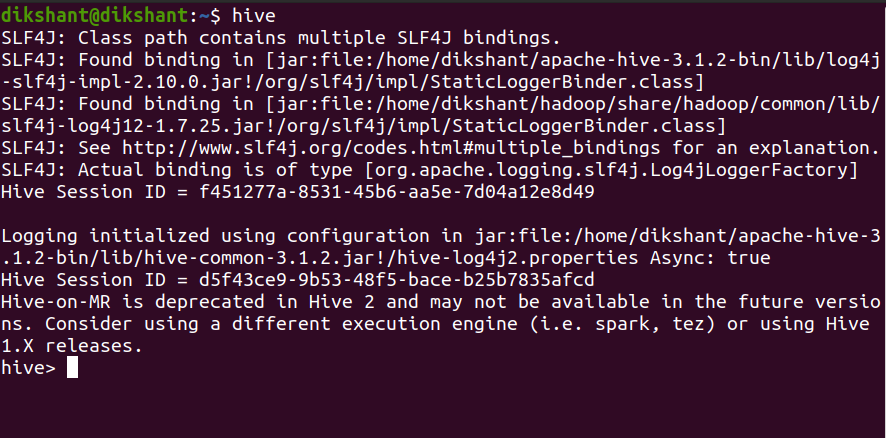
To perform the below operation make sure your hive is running. Below are the steps to launch a hive on your local system.
Step 1: Start all your Hadoop Daemon
Step 2: Launch hive from terminal
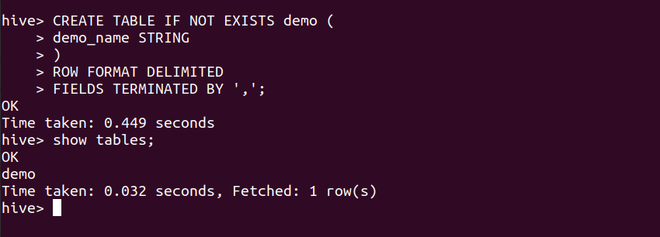
Let’s make a table demo with one attribute demo_name of type string in the hive (By default hive makes tables in its default database if not specified).
Let’s perform each of the operations we can perform with ALTER TABLE one by one.
1. Renaming Table Name
ALTER TABLE with RENAME is used to change the name of an already existing table in the hive.
Syntax:
Command:
Let’s rename our table name from the demo to the customer.
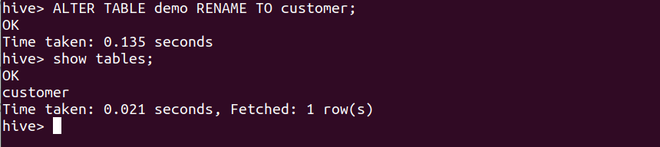
In the above, the image we can observe that our table name has changed to customer.
2. ADD Columns
Syntax:
ALTER TABLE <table_name> ADD COLUMNS (<col-name> <data-type> COMMENT ”, <col-name> <data-type> COMMENT ”, ….. )
Command:
Let’s add a column contact to the customer table that we have obtained after renaming the demo.
ALTER TABLE customer ADD COLUMNS ( contact BIGINT COMMENT ‘Store the customer contact number’);
We can describe the table to see its properties with the below command.

We have successfully added the contact column to the customer table.
3. CHANGE Column
CHANGE in ALTER TABLE is used to change the name or data type of an existing column or attribute.
Syntax:
Command:
Let’s change the demo_name attribute to customer_name.
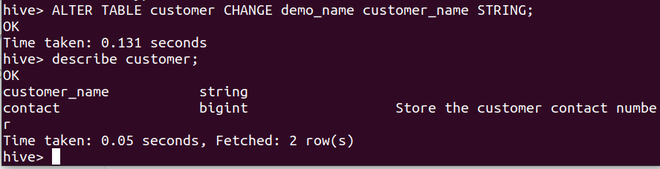
4. REPLACE Column
The REPLACE with ALTER TABLE is used to remove all the existing columns from the table in Hive. The attributes or columns which are added in the ALTER TABLE REPLACE statement will be replaced with the older columns.
Syntax:
For example in our customer table, we have 2 attributes customer_name and contact. If we want to remove the contact attribute the query should be like as shown below.
Command:
We should mention the column we want.

In the above image, we can observe that we have successfully dropped the column contact. Hive does not have any DROP statement to drop columns inside the table. We have to use REPLACE if we want to drop a particular column.
Hive Alter table command (MSCK and alter syntax)
The Hive ALTER TABLE command is used to make changes to existing tables, such as adding, dropping, or modifying columns, partitioning, bucketing, or changing storage properties. Here, I’ll explain two commonly used aspects of the ALTER TABLE command in Hive:
1. MSCK (Managed Schema Check):
The `MSCK REPAIR TABLE` command is used to synchronize the Hive metastore with the underlying data in HDFS. This is especially useful when you add or remove partitions manually in HDFS, and you want Hive to recognize these changes.
Syntax for MSCK REPAIR TABLE:
MSCK REPAIR TABLE table_name;
Example:
MSCK REPAIR TABLE my_table;
2. ALTER TABLE Syntax:
The `ALTER TABLE` command in Hive allows you to modify the structure and properties of an existing table.
Syntax for ALTER TABLE:
ALTER TABLE table_name
[ADD | DROP] [COLUMN] column_name data_type [COMMENT ‘column_comment’] [FIRST | AFTER column_name]
[REPLACE COLUMNS (column1 data_type [COMMENT ‘column1_comment’], …)]
[CHANGE [COLUMN] old_column_name new_column_name new_data_type [COMMENT ‘new_column_comment’] [FIRST | AFTER column_name]]
[SET TBLPROPERTIES (property_name = property_value, …)]
[SET SERDE serde_name [WITH SERDEPROPERTIES (property_name = property_value, …)]]
[PARTITIONED BY (col_name data_type [COMMENT ‘col_comment’], …)]
[CLUSTERED BY (col_name) [SORTED BY (col1 [ASC|DESC], …)] INTO num_buckets BUCKETS]
[SORTED BY (col1 [ASC|DESC], …) INTO num_buckets BUCKETS]
[ROW FORMAT row_format]
[STORED AS file_format]
[LOCATION ‘hdfs_path’]
[TBLPROPERTIES (property_name = property_value, …)];
Here are some common subcommands and their descriptions:
— `ADD COLUMN`: Adds a new column to the table.
— `DROP COLUMN`: Removes a column from the table.
— `REPLACE COLUMNS`: Replaces the columns of the table.
— `CHANGE COLUMN`: Changes the name and data type of a column.
— `SET TBLPROPERTIES`: Sets table-level properties.
— `SET SERDE`: Sets the SerDe (Serializer/Deserializer) for the table.
— `PARTITIONED BY`: Specifies the partition columns.
— `CLUSTERED BY`: Specifies bucketing and sorting options.
— `ROW FORMAT` and `STORED AS`: Define the data format and storage format.
— `LOCATION`: Specifies the HDFS location for the table data.
Example (adding a new column to an existing table):
ALTER TABLE my_table
ADD COLUMN new_column INT;
Example (changing a column’s name and data type):
ALTER TABLE my_table
CHANGE COLUMN old_column_name new_column_name STRING;
Example (setting table properties):
ALTER TABLE my_table
SET TBLPROPERTIES (‘comment’ = ‘This is my table’);
The `ALTER TABLE` command in Hive is versatile and allows you to make various changes to your tables to accommodate evolving data requirements or improve performance.
Create, Alter, Delete Tables in Hive
Creating a Hive table is similar like creating a table in SQL like databases. However, the Hive offers a lot of flexibility while creating tables from where to store data to which format to use store data. In this blog, we will discuss many of these options and different operations that we can perform on Hive tables.
Creating Table
Like SQL conventions, we can create a Hive table in the following way. We can use the database name prefixed with a table in create a table in that database.
Usage of ALTER in Hadoop Hive
Alter is a DDL command which helps in modifying the structure of the database objects. We can change the user provided properties of the database, structure of the tables and name of the objects.
Database Level:
Database Properties:
ALTER (DATABASE|SCHEMA) database_name
SET DBPROPERTIES (property_name = property_value, …);
This helps in modifying the database properties which user has provided at the time of database creation.
Example:
ALTER DATABASE TestDB SET dbProperties(‘Edited’= ‘UserName’, ‘Created’= ’2020-08-01’);
Database Access:
ALTER (DATABASE|SCHEMA) database_name SET OWNER [USER|ROLE] user_or_role;
This command helps in modifying the access level to a different user or a role.
Example:
ALTER DATABASE TestDB SET OWNER USER cloudera;
Database Location:
ALTER (DATABASE|SCHEMA) database_name SET LOCATION hdfs_path;
Though it is documented that the database location can be changed, however it is not allowing to do so in Hive 1.1.0 in CDH 5.10.0
Database Name:
ALTER DATABASE test_db RENAME TO test_db_new;
Though this is also documented but renaming a database is not allowed in Hive 1.1.0 in CDH 5.10.0
Note: As per the link here, there is no functionality to rename the existing database however there is a workaround to rename the database if you have necessary privileges on Hive metastore without changing the database location.
Table Level:
Renaming A Table:
ALTER TABLE [old_db_name.]old_table_name RENAME TO [new_db_name.]new_table_name;
Example:
ALTER TABLE tbOutput RENAME TO tbResults
Adding Columns of an Existing Table:
ALTER TABLE name ADD COLUMNS (col_spec[, col_spec …]);
Example:
ALTER TABLE test ADD COLUMNS (Col2 string, Col3 int)
Change Column Type
ALTER TABLE name CHANGE column_name new_name new_type;
Example:
ALTER TABLE test CHANGE col2 col2 int;
Change Column Type and Name
ALTER TABLE name CHANGE column_name new_name new_type;
Example:
ALTER TABLE test CHANGE col2 col4 string;
Replace Columns in the Table:
ALTER TABLE name REPLACE COLUMNS (col_spec[, col_spec …]);
The above command used to remove all existing columns and adds the new set of columns. REPLACE is used when you want to have an altogether different columns to your table.
Example:
ALTER TABLE test REPLACE COLUMNS (id int, col2 int, col3 string)
Change Table’s Location:
ALTER TABLE [TABLENAME] SET LOCATION [NewLocation]
Example:
ALTER TABLE tblTest SET LOCATION “hdfs:/DB/dbTest”;